Business checks are imperative for business owners, but there's one type that is often overlooked - Quickbooks® checks. QuickBooks® checks are checks that are specifically designed to be used with the QuickBooks® accounting software.
You may also find this useful: 7 steps in designing custom business checks.
Here are seven reasons why a business might choose to use QuickBooks® checks:
- Easy integration: QuickBooks® checks can be easily integrated with the QuickBooks accounting software, allowing businesses to print checks directly from within the software. This eliminates the need to manually enter check information and can save time and reduce the risk of errors.
- Convenient tracking: With QuickBooks® checks, businesses can easily track and record check payments within the QuickBooks® software. This can help to simplify the accounting process and make it easier to manage finances.
- Customizable: Many providers offer customizable options for QuickBooks® checks, such as the ability to add logos, customize color schemes and incorporate security features. This can give businesses more control over the appearance and security of their checks.
- Professional Look: With pre-printed company details, date, and signature line, the Quickbooks® checks give a more professional look to the check, which can be beneficial for the company's image.
- Secure: QuickBooks® checks include security features, such as watermarks, microprinting, and holograms, to help prevent check fraud.
- Good Record Keeping: Quickbooks® checks can be easily stored and recorded within the software, which can help businesses keep accurate records of all transactions and simplify the tax reporting and budgeting process.
- Cost-effective: Many providers offer QuickBooks® checks at a lower cost than traditional checks. This can help businesses save money on check printing while still enjoying the benefits of the QuickBooks® software.
It's worth mentioning that, Quickbooks® checks are designed to be used in conjunction with the software, so before choosing to use them, it is important to ensure that your business is already using or planning to use Quickbooks® software for accounting purposes.
QuickBooks Check Formats: Choosing the Right One for Your Business
Once you decide to use QuickBooks checks, the next step is choosing the correct format. The format must match the check style setting in your QuickBooks software. There are three formats available from Checkomatic, each designed for a different business use case.
Check on Top QuickBooks Checks (Voucher Format)
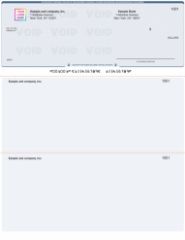
Check on top QuickBooks voucher checks from Checkomatic, the default format for QuickBooks Desktop and Online.
The check-on-top format, also called the voucher format, is the default print template for both QuickBooks Desktop and QuickBooks Online. The check prints at the top of the 8.5 x 11 sheet with two perforated stubs below. One stub goes to the vendor as a remittance document. The second stays in your files as the AP record. This is the format most small businesses use for accounts payable and payroll check printing through QuickBooks. See check on top QuickBooks checks.
3 on a Page QuickBooks Checks
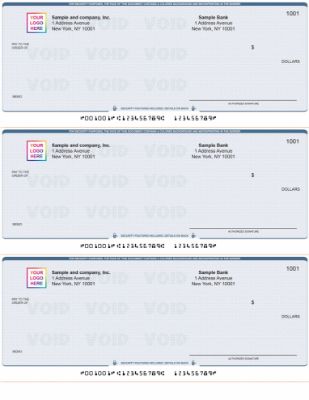
3 on a page QuickBooks checks from Checkomatic, three checks per sheet for high-volume AP printing.
The 3-on-a-page format, also called the Standard template in QuickBooks, prints three checks per sheet with no stubs. It is used by businesses that need to process a high volume of AP checks per print run and maintain their payment records electronically in QuickBooks rather than on paper stubs. See 3 on a page QuickBooks checks.
Wallet/Personal QuickBooks Checks
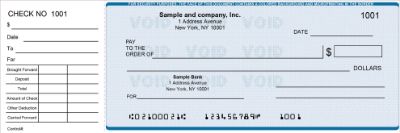
Wallet QuickBooks checks from Checkomatic for sole proprietors and low-volume QuickBooks printing.
The wallet format is a compact QuickBooks check suited to sole proprietors and low-volume operations that occasionally need to print a check from QuickBooks without the full voucher format. See wallet/personal QuickBooks checks.
For a first order to confirm format and print quality before committing to a larger quantity, see the QuickBooks starter pack. For the full QuickBooks check range, see QuickBooks checks.
Security Features on Every QuickBooks Check: What They Actually Do
The original article correctly identifies security as one of the key reasons to use QuickBooks checks. Here is exactly what each security feature does and why it matters for check fraud prevention.
- Chemical-reactive paper: Stains visibly when washing solvents are applied. Check washing is the most common fraud method targeting business AP checks. This feature reveals any alteration attempt before the bank processes the check.
- Microprint signature line: Tiny repeating text printed along the signature line that blurs on any photocopy, flagging a reproduced check at the bank.
- Void pantograph: A background pattern that makes the word VOID appear clearly when the check is photocopied or scanned, preventing counterfeiting by reproduction.
- Heat-sensitive ink: Disappears when pressed with a warm thumb. Bank tellers use this as a quick authenticity test for checks presented in person.
- Coin-reactive ink: Changes appearance when rubbed with a hard metal object, providing a second physical authenticity test at the bank counter.
- True watermark: Visible from both sides of the paper under light, embedded during manufacturing and impossible to reproduce by printing or copying.
All six features are ABA-compliant and included on every Checkomatic QuickBooks check at the base price. No security upgrade is needed. For the complete guide to business check fraud prevention, see are business checks safe: security features that actually matter and check fraud prevention: the complete business guide.
How to Set Up QuickBooks Check Printing
Getting QuickBooks check printing configured correctly before your first print run prevents wasted checks from misalignment errors. The setup process takes about 10 minutes in QuickBooks and consists of matching your printer settings to your check stock format.
QuickBooks Online Check Printing Setup
For step-by-step instructions on setting up check printing in QuickBooks Online, including selecting the correct check style, configuring the printer, and running a test print alignment on plain paper before using check stock, see how to set up check printing in QuickBooks Online.
QuickBooks Desktop Check Printing Setup
For step-by-step instructions on configuring check printing in QuickBooks Desktop, including the Printer Setup menu, selecting the correct check style (Voucher, Standard, or Wallet), and fine-tuning print alignment for your specific printer, see how to print checks from QuickBooks Desktop.
Customizing Your QuickBooks Checks
The original article correctly notes that QuickBooks checks are customizable. Here is what customization actually includes when ordering from Checkomatic.
- Company logo: Black and white logo printing is free on every QuickBooks check order. Upload a JPEG or TIFF logo file during the ordering process. Color logo printing is available for a small additional charge. For full logo customization options, see business checks with custom logo: where to order now.
- Background color and design: 20 background color and texture options across multiple design styles. Colors include blue, burgundy, brown, gold, green, and others.
- Starting check number: Set at checkout to match your current check register sequence in QuickBooks. This ensures the check numbers on your printed stock match what QuickBooks records.
- Extra signature lines: Available for businesses that require dual-signature authorization on checks. Specify at checkout.
For the complete guide to designing business checks for your brand and workflow, see 7 steps in designing custom business checks. For full software compatibility across QuickBooks, Quicken, Sage, and other platforms, see accounting software compatible business checks.
Visit Checkomatic.com to shop Business Checks and follow us on Facebook, LinkedIn, and YouTube.
What Customers Say About Checkomatic QuickBooks Checks
All reviews below are published on checkomatic.com and reproduced verbatim. Source: checkomatic.com/quickbooks-starter-pack-product, 4.5 stars from 166 verified reviews.
"Been with them for 15 years. Always reliable, always good quality, good service. What more can you ask for?"
ATV Inc. | ★★★★★ 5/5 | April 5, 2024 | Source: checkomatic.com/quickbooks-starter-pack-product
"First time ordering and I am super impressed with the quality of the checks. No issues with delivery. I will be ordering again!"
TClinton | ★★★★★ 5/5 | April 9, 2025 | Source: checkomatic.com/quickbooks-starter-pack-product
"We use CheckoMatic for all of our check needs! They have great prices and we receive our products in a timely manner!"
CG's Tax Service | ★★★★★ 5/5 | September 18, 2024 | Source: checkomatic.com/quickbooks-starter-pack-product
"I got 500 checks for less than half of what the bank wanted for 200!"
VVA Voucher Checks (Vietnam Veterans of America) | ★★★★★ 5/5 | July 6, 2024 | Source: checkomatic.com/quickbooks-starter-pack-product
"ASJ Wilson Construction has been a client of checkomatic for some years now and they've never disappointed this company. Thank you checkomatic for all that you do."
ASJ Wilson Construction | ★★★★★ 5/5 | June 6, 2024 | Source: checkomatic.com/quickbooks-starter-pack-product
"Affordable and efficient. My go-to business check printer."
Doe | ★★★★★ 5/5 | January 24, 2025 | Source: checkomatic.com/quickbooks-starter-pack-product