When choosing between manual and computer business checks, there are several factors to consider.
- The volume of checks: If you write a high volume of checks, computer checks may be more efficient as they can be printed in bulk.
- Customization: Manual checks offer more options for customization, such as different colors, fonts, and logos.
- Security: Computer checks may offer more security features, such as watermarks, security screens, and tamper-resistant paper.
- Cost: Computer checks may be more expensive initially but they can save money in the long run if you are printing a high volume of checks.
- Convenience: Computer checks can be printed on demand, while manual checks need to be ordered in advance.
Pros of Manual Business Checks:
- Handwritten option
- Fit into binder helping business owners and entrepreneurs stay organized.
- Created to serve small businesses.
- Perforated edges leaving stub in the binder for records.
- There are a few versions to select from making the order process quick and easy.
- Accounts Payable
- Payroll
- Multi-Purpose
Pros of Computer Business Checks:
- Compatible with printing software
- Pre-printed company name and bank information
- Micro-printing on micro lines
How Do I Know If My Business Needs Manual or Computer Checks?
The most reliable starting point is your monthly check volume. Everything else follows from it. Here is how the math works at three common volume levels:
| Monthly Volume | Manual Time | Computer Time | Verdict |
|---|---|---|---|
| Under 10 checks | ~35 min | ~20 min (including setup overhead) | Manual wins. No printer or software needed. |
| 10 to 20 checks | ~45 to 70 min | ~12 to 15 min once configured | Borderline. Manual if no software; computer if already using QuickBooks. |
| Over 20 checks | 70+ min | Under 15 min | Computer checks. Time savings are meaningful at this volume. |
Writing one manual check takes roughly 3 to 4 minutes including filling the stub. Printing a computer check through accounting software takes 20 to 30 seconds once the print job is configured. At 20 checks per month, that gap adds up to roughly 11 hours per year. For a business owner doing their own bookkeeping, 11 hours is real time worth recapturing.
What is the 20-check rule for choosing between check types?
The 20-check-per-month threshold is the widely used practical guideline across the check printing industry. Below 20, the setup time and ongoing printer management for computer checks typically offsets the speed advantage. Above 20, the time savings from printing consistently outweigh the setup cost. At 30 or more checks per month, computer checks are almost always the more efficient choice regardless of other factors.
Three specific situations where manual checks are the right answer
- Low volume, no accounting software: Sole proprietors, very small service businesses, and landlords with one or two properties who write occasional checks and do not use accounting software. Manual checks cost less per check and need no printer configuration.
- Field payments: Construction crews, HVAC technicians, plumbers, landscapers, and other field-service businesses often need to pay subcontractors or suppliers on-site. You cannot print a check at a job site. Manual checks in a deskbook or pocket format solve this immediately. See executive deskbook checks and pocket checks.
- Bridge while waiting for computer stock: Computer checks are custom-printed with your company name, bank details, and ABA routing number. They take longer to manufacture than manual checks. If you have opened a new bank account and need checks immediately, manual checks are the fastest way to start writing checks while your computer check order is in production.
Can I Use Both Manual and Computer Checks on the Same Bank Account?
Yes, and many businesses do. This is called a hybrid check setup. The most common arrangement is computer checks for scheduled AP and payroll print runs, and manual checks for field payments, emergency situations, or quick reimbursements where printing is not practical.
How to manage check numbers when running both types
The one thing that trips up hybrid setups is check number management. If two different people or workflows are writing checks from the same account using different check number sequences, month-end bank reconciliation becomes difficult. The solution is practical: assign non-overlapping check number ranges to each type before ordering.
A simple example:
- Computer AP checks: start at 1001
- Manual field checks: start at 5001
- Payroll checks (if separate): start at 9001
With non-overlapping ranges, every check number in the ledger immediately identifies which account and which check type it belongs to. Your bookkeeper can reconcile both sets without hunting for which register a check number came from. Manual checks written in the field must be entered into your accounting software within 24 hours of being written, or your bookkeeper will fall behind on reconciliation.
Which Is Easier to Set Up: Manual or Computer Checks?
How long does it take to set up computer check printing?
Manual checks take zero setup time. Open the binder, write the check, done. Computer checks require a one-time configuration that takes 15 to 30 minutes the first time. You need to:
- Open your accounting software's check printing settings (in QuickBooks Desktop: File, then Printer Setup, then Check from the Form Name dropdown).
- Select the correct check style (voucher/check-on-top, standard, or wallet) that matches the check stock you ordered.
- Run a test print on plain paper and hold it up to a check sheet to verify alignment before loading real check stock.
- Adjust horizontal and vertical offsets if anything is misaligned.
Once configured, subsequent print jobs take seconds. The 15 to 30 minutes is a one-time cost. For the complete setup walkthrough, see how to set up check printing in QuickBooks Online and how to print checks from QuickBooks Desktop.
Why are my computer checks printing out of alignment?
This is the most common problem business owners run into after ordering computer checks for the first time. Three settings cause roughly 95 percent of all alignment problems:
- Page scaling is ON: Your print dialog is shrinking or stretching the page to fit. Turn page scaling OFF entirely. In Adobe Reader, uncheck "Fit" and select "Actual Size."
- Paper size is set to A4 instead of Letter: Computer checks are sized for 8.5 x 11 inch letter paper. If your printer defaults to A4 (which is slightly longer), every field shifts down by a fraction of an inch. Set paper size to Letter.
- Wrong format ordered vs software output: If your software outputs check-on-top and you ordered check-in-middle, nothing will align. Confirm your software's check style before ordering. Run a test print on plain paper first.
Do I need special ink or toner to print computer checks?
No. The MICR line, which is the row of magnetic characters at the bottom of every check that banks use to read your routing number, account number, and check number, is pre-printed in certified magnetic toner during manufacturing. Your office printer only needs to print the variable payment data (payee name, dollar amount, date, memo) on top of the pre-printed sheet. Standard laser or inkjet toner handles this fine. You do not need to buy MICR toner or a special printer. For the full MICR explanation, see MICR line explained: what it is and why it matters.
Manual Business Check Formats: Which Type for Which Payment
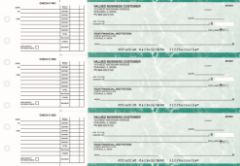
Manual AP checks from Checkomatic: handwritten 3-on-page with perforated stub for vendor and supplier records.
The original article lists three manual check types. Here is what each is actually for, including two additional formats not originally mentioned:
Accounts Payable (AP) checks
For paying vendors, suppliers, contractors, and service providers by hand. The stub stays in the binder as the payment record, including vendor name, invoice number, and amount. Ideal for businesses writing 5 to 15 vendor checks per month without accounting software. See manual 3-on-page accounts payable checks.
Payroll checks
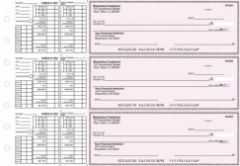
Manual payroll checks from Checkomatic with earnings stub for gross pay, deductions, and net pay.
For paying employees with a pay stub documenting hours, gross pay, deductions, and net pay. The stub satisfies most state pay stub requirements without payroll software. Also useful as a payroll backup when your computer check workflow is unavailable. See manual payroll checks.
Multi-Purpose checks
A flexible stub layout for mixed AP and payroll use from one checkbook. Right for sole proprietors writing a combination of vendor payments, owner draws, and occasional employee checks who prefer one format over maintaining separate AP and payroll binders. See manual multi-purpose checks.
Executive Deskbook and Pocket checks
Compact, portable formats for writing checks at job sites, client offices, or any location without a printer. The executive deskbook fits in a briefcase. Pocket checks are wallet-sized. Both include the same security features as full-size formats. See executive deskbook checks and pocket checks.
Computer Business Check Formats: Matching Your Accounting Software
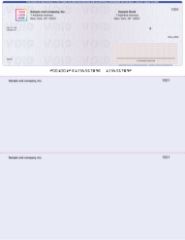
Check-on-top computer business checks from Checkomatic: the default QuickBooks Desktop and QuickBooks Online format.
Computer checks must match your software's print template exactly. The wrong format means misaligned fields on every sheet. Confirm your software's check style before ordering, then run a test on plain paper before loading check stock.
| Format | Layout | Primary Software | Checkomatic Link |
|---|---|---|---|
| Check on Top | Check at top, two stubs below | QuickBooks Desktop, QuickBooks Online, Quicken | Check-on-top |
| Check in Middle | Check center, stubs above and below | Sage 50, some Deltek configurations | Check-in-middle |
| Check on Bottom | Check at bottom, two stubs above | Payroll layouts, some Peachtree | Check-on-bottom |
| 3-on-a-Page | Three checks per sheet, no stubs | High-volume AP, records kept in software | 3-on-a-page |
For the full software compatibility guide covering QuickBooks, Sage, Xero, MYOB, Quicken, Peachtree, and more, see accounting software compatible business checks. For QuickBooks-specific formats, see QuickBooks checks.
Will Banks Accept Handwritten Checks the Same as Printed Ones?
Yes, completely. This is one of the most common misconceptions about manual checks.
Banks do not process checks by reading the handwritten or printed text in the payee, amount, or date fields. They process checks by reading the MICR line, which is the row of specially shaped magnetic characters printed at the bottom of every check. The MICR line contains your bank's ABA routing number, your account number, and the check number. Bank reader-sorter machines scan this line optically and magnetically to route the check through the payment system and debit the correct account.
The MICR line is pre-printed during manufacturing on both manual and computer checks. Whether you fill in the rest of the check by hand or your accounting software fills it in at print time makes no difference to the bank. Both types clear through the Federal Reserve payment system by the same process, on the same timeline, with the same finality. For the complete MICR explanation, see MICR line explained: what it is and why it matters.
Can Manual Business Checks Have My Company Logo?
Yes. This surprises many people because the assumption is that manual checks are plain and only computer checks can be branded. It is not accurate.
Manual business checks from Checkomatic can be ordered with your company logo printed on them, in the same position and at the same quality as logo printing on computer checks. The process is identical: you provide your logo file at the time of ordering, and it is printed during check manufacturing. The customization options, including colors, fonts, and logo placement, apply equally to manual and computer formats.
If your manual checks are going to vendors, clients, or employees, a professional-looking branded check reinforces your business identity the same way a printed computer check does. See business checks with custom logo for the full customization guide.
Security Features: Both Check Types Include the Same Protection
The original article notes that computer checks may offer more security features. For Checkomatic checks specifically, both manual and computer formats include the same six ABA-compliant security features at the base price. The format you choose does not affect the security of the check paper.
- Chemical-reactive paper: Stains visibly when washing solvents are applied, protecting against check washing attacks.
- Microprint signature line: Text too small to read with the naked eye blurs on any photocopy, flagging counterfeits.
- Void pantograph: VOID appears clearly when the check is photocopied or scanned, even in color.
- Heat-sensitive ink: Disappears when pressed with a warm thumb , a bank teller authenticity test.
- Coin-reactive ink: Changes appearance when rubbed with a metal object.
- True watermark: Visible from both sides under light, absent from counterfeited check paper.
For the complete fraud prevention guide, see are business checks safe: security features that actually matter and check fraud prevention guide.
Organizing Checks and Staying IRS-Ready
The original article correctly notes that manual checks fit into a binder and help business owners stay organized. This is the primary recordkeeping advantage of manual checks for low-volume operations.
The check binder holds your check register and all check stubs together. Each stub acts as a physical payment record: date, payee, amount, and purpose. For businesses with simple finances and low check volume, the binder is a complete, paper-based payment record that satisfies IRS recordkeeping requirements for business payments without any software.
The IRS requires businesses to keep records of all business payments, including check payments, for at least three years from the date the return was filed (or two years from when the tax was paid, whichever is later). Manual check stubs, organized in a 7-ring binder, are an accepted form of this recordkeeping. For more on IRS recordkeeping requirements for small business, see IRS Publication 583: Starting a Business and Keeping Records.
External link, opens in new tab.
For a dedicated 7-ring binder designed to hold 3-on-page manual business checks and their stubs, see 7-ring check binders.
Computer check users maintain records electronically in their accounting software. Each check printed through QuickBooks or Sage is automatically posted as a transaction in the ledger, creating a reconcilable AP record at the same time the check is produced. This is one of the primary operational advantages of computer checks for higher-volume businesses.
Ultimately, the choice between manual and computer checks will depend on your specific needs and preferences. It is recommended to review the option and select the one that best suits your business needs.
Visit Checkomatic.com to shop for Business Checks and follow us on Facebook, LinkedIn, and YouTube.
What Customers Say About Checkomatic
All reviews below are published on checkomatic.com and reproduced verbatim. Source: checkomatic.com/quickbooks-starter-pack-product, 4.5 stars from 166 verified reviews.
Verified customer review | Source: checkomatic.com
"Been with them for 15 years. Always reliable, always good quality, good service. What more can you ask for?"
ATV Inc. | ★★★★★ 5/5 | April 5, 2024 | Source: checkomatic.com/quickbooks-starter-pack-product
"First time ordering and I am super impressed with the quality of the checks. No issues with delivery. I will be ordering again!"
TClinton | ★★★★★ 5/5 | April 9, 2025 | Source: checkomatic.com/quickbooks-starter-pack-product
"We use CheckoMatic for all of our check needs! They have great prices and we receive our products in a timely manner!"
CG's Tax Service | ★★★★★ 5/5 | September 18, 2024 | Source: checkomatic.com/quickbooks-starter-pack-product
"I got 500 checks for less than half of what the bank wanted for 200!"
VVA Voucher Checks (Vietnam Veterans of America) | ★★★★★ 5/5 | July 6, 2024 | Source: checkomatic.com/quickbooks-starter-pack-product
"ASJ Wilson Construction has been a client of checkomatic for some years now and they've never disappointed this company. Thank you checkomatic for all that you do."
ASJ Wilson Construction | ★★★★★ 5/5 | June 6, 2024 | Source: checkomatic.com/quickbooks-starter-pack-product
"Affordable and efficient. My go-to business check printer."
Doe | ★★★★★ 5/5 | January 24, 2025 | Source: checkomatic.com/quickbooks-starter-pack-product