We pride ourselves on our ability to offer the most affordable options online.
Available in various colors, styles, and formats; such as Check-on-Top, Check-in-Middle, Check-on-Bottom, and Three-on-a-Page, our business checks feature advanced security enhancements that comply with the guidelines of the American Bankers Association.
Checkomatic now offers manual and computer business checks in regular business check sizing - 12.5 x 9 - with advanced security features to protect customer personal information.
Pros of Manual Business Checks:
- Handwritten option
- Fit in to binder helping business owners and entrepreneurs stay organized
- Created to serve small business
- Perforated edges leaving stub in the binder for records
- There are a few versions to select from making the order process quick and easy
- Accounts Payable
- Payroll
- Multi-Purpose
Pros of Computer Business Checks:
- Compatible with printing softwares
- Pre-printed company name and bank information
- Micro-printing on micro lines
Nonetheless, these laser business checks benefit all company sizes and industries. However, they are especially recommended for companies with bookkeeping software.
How Laser Business Checks Work
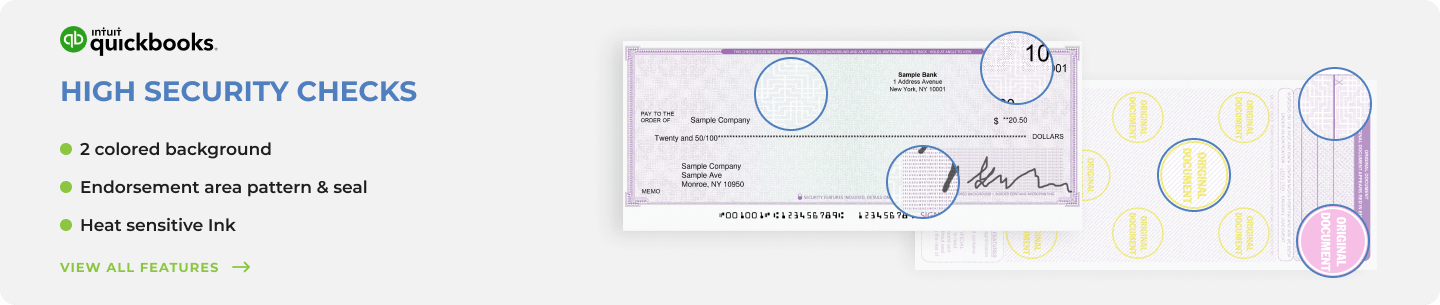
Checkomatic laser business checks, pre-printed with your company name and banking details, completed by accounting software at print time.
A laser business check is a partially pre-printed sheet of check paper. The check manufacturer prints your company name, business address, bank name, ABA routing number, and account number on the stock before it arrives at your office. When you run a check print job in QuickBooks, Sage, Xero, Quicken, or another accounting platform, the software prints the variable information onto the pre-printed sheet: the payee name, dollar amount in numbers and words, check date, check number, and any memo or stub detail.
Related guide: what QuickBooks checks are and how they work.
You load the check stock into your laser or inkjet printer, run the print job, sign the checks, and send them. The MICR line at the bottom of each check is pre-encoded in certified magnetic ink by Checkomatic during manufacturing. Banks scan this line to route the check automatically during processing. The result is a professional, bank-accepted payment document that takes seconds to produce per check rather than the minutes a handwritten check requires.
For a full technical explanation of how the MICR line works and why it matters for check processing, see MICR line explained: the technology behind every check.
The Four Laser Business Check Formats
Check-on-top laser business check from Checkomatic, the most common format for QuickBooks and AP payments.
The format you order must match your accounting software's default print template exactly. Ordering the wrong format means every check in the batch prints with misaligned fields and cannot be used. Here is what each format does and which software typically uses it.
Check on Top
The check prints at the top of the 8.5 x 11 inch sheet. Two perforated voucher stubs sit below it. One stub goes to the vendor or employee as a payment record. The other stays in your accounts payable or payroll files. This is the most widely used laser check format and the default for QuickBooks Desktop, QuickBooks Online, and Quicken. See check-on-top laser business checks.
Check in Middle
The check prints centered on the sheet with one stub above it and one below. This format is used by some Sage 50 configurations, Deltek, and older Peachtree templates. If your software's print setup places the check in the center of the page, this is the format to order. See check-in-middle laser business checks.
Check on Bottom
The check prints at the bottom of the sheet with two stubs above it. Payroll departments often prefer this layout because the earnings stub detail is the first thing visible when an employee opens the envelope. See check-on-bottom laser business checks.
3-on-a-Page
Three separate checks print on one 8.5 x 11 inch sheet with no voucher stubs. This format is used for high-volume accounts payable operations where stub records are maintained in the accounting software rather than on paper, and for nonprofits and offices that write many small-amount checks per run. See 3-on-a-page laser business checks.
Accounting Software Compatibility
Checkomatic laser business checks are formatted to work with all major accounting and bookkeeping platforms. The check stock is pre-printed to ABA standards, and the field positions align with each platform's default print template.
| Accounting Software | Recommended Format | Checkomatic Link |
|---|---|---|
| QuickBooks Desktop and Online | Check on top (Voucher) | QuickBooks checks |
| Quicken Home and Business | Check on top (Voucher) | Computer checks |
| Sage 50 / Peachtree | Check in middle | Check in middle |
| Xero, Wave, FreshBooks | Check on top (Voucher) | Software compatible checks |
| MYOB, NetSuite | Check on top or 3-on-page | Software compatible checks |
For the complete software compatibility guide and how to set up check printing in your specific platform, see computer printable checks: how to choose and print them and how to set up check printing in QuickBooks Online.
Security Features on Every Laser Business Check
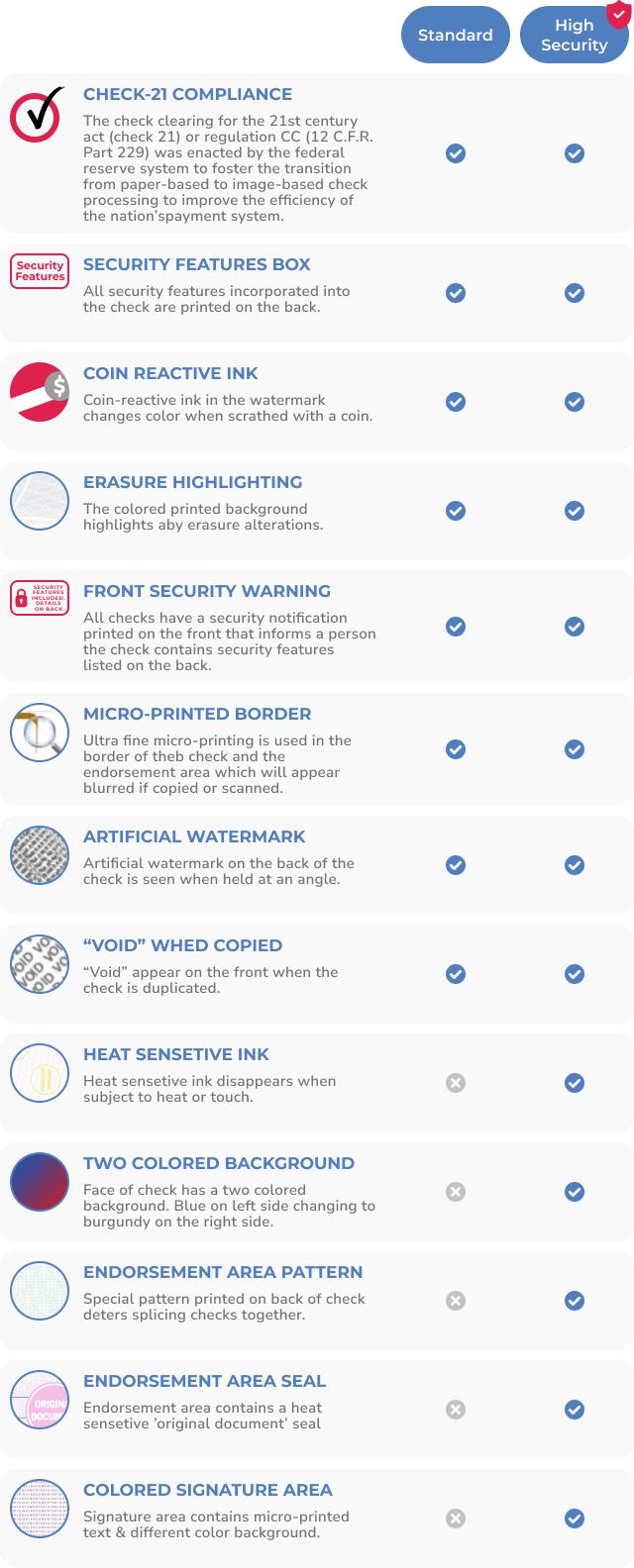
Security features on every Checkomatic laser business check, all included at the base price on every order.
Every Checkomatic laser business check includes the following security features as standard on every order. These features comply with American Bankers Association guidelines and protect against the most common forms of check fraud, including check washing, counterfeiting, and alteration.
- Chemical-reactive paper: Stains visibly when washing solvents such as acetone or bleach are applied, revealing alteration attempts before the bank processes the check.
- Microprint signature line: Tiny repeating text along the signature line that appears as a thin line to the naked eye but blurs clearly on any photocopy or scan.
- Void pantograph: Background pattern that causes the word VOID to appear when the check is photocopied or scanned, flagging reproductions at the bank.
- Heat-sensitive ink: Disappears when pressed with a warm thumb , a standard bank teller authenticity test for suspicious checks.
- Coin-reactive ink: Changes appearance when rubbed with a hard metal object, providing a quick physical authentication test.
- True watermark: Visible from both sides when held to light; absent from counterfeits printed on plain paper.
For the complete security feature guide and advice on protecting your business from check fraud, see are business checks safe: security features that actually matter.
Laser Business Checks vs Manual Business Checks
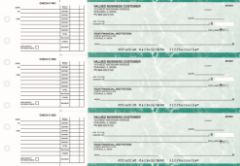
Manual 3-on-page AP checks from Checkomatic, for businesses that prefer handwritten payments without accounting software.
The original pros sections above summarize the key differences. Here is a practical decision guide based on how your business actually writes checks.
| Factor | Laser Checks | Manual Checks |
|---|---|---|
| Requires printer | Yes , laser or inkjet | No |
| Software integration | Full , QuickBooks, Sage, Xero, etc. | None needed |
| Best for check volume | 20+ checks per month | Fewer than 20 per month |
| Field / portable use | No , needs office printer | Yes , binder or pocket format |
| Payment record | Automatic in accounting software | Manual stub entry |
| Security features | All 6 standard on every order | All 6 standard on every order |
Many businesses run both formats from the same account: laser checks for regular AP and payroll at the office, and manual binder checks for field payments, on-site vendor payments, or any check written away from a printer. For the full manual check range, see manual business checks.
As always, please contact our customer service at 1-800-555-6374 or sales@checkomatic.com with any questions.
Visit Checkomatic.com to shop for Business Checks, Computer Checks, or Manual Checks, and follow us on Facebook, LinkedIn, and YouTube.
What Customers Say About Checkomatic
All reviews below are published on checkomatic.com and reproduced verbatim. Source: checkomatic.com/quickbooks-starter-pack-product, 4.5 stars from 166 verified reviews.
"Been with them for 15 years. Always reliable, always good quality, good service. What more can you ask for?"
ATV Inc. | ★★★★★ 5/5 | April 5, 2024 | Source: checkomatic.com/quickbooks-starter-pack-product
"First time ordering and I am super impressed with the quality of the checks. No issues with delivery. I will be ordering again!"
TClinton | ★★★★★ 5/5 | April 9, 2025 | Source: checkomatic.com/quickbooks-starter-pack-product
"We use CheckoMatic for all of our check needs! They have great prices and we receive our products in a timely manner!"
CG's Tax Service | ★★★★★ 5/5 | September 18, 2024 | Source: checkomatic.com/quickbooks-starter-pack-product
"I got 500 checks for less than half of what the bank wanted for 200!"
VVA Voucher Checks (Vietnam Veterans of America) | ★★★★★ 5/5 | July 6, 2024 | Source: checkomatic.com/quickbooks-starter-pack-product
"ASJ Wilson Construction has been a client of checkomatic for some years now and they've never disappointed this company. Thank you checkomatic for all that you do."
ASJ Wilson Construction | ★★★★★ 5/5 | June 6, 2024 | Source: checkomatic.com/quickbooks-starter-pack-product
"Affordable and efficient. My go-to business check printer."
Doe | ★★★★★ 5/5 | January 24, 2025 | Source: checkomatic.com/quickbooks-starter-pack-product