Why Business Checks Are Essential for Every Business
When it comes to running a business, there are some office items every business owner must keep in stock. One of those necessary items includes business checks. Business checks are important because they make running payroll and paying vendors a much easier process.
Nonetheless, business checks are important for any business - from the smallest mom-and-pop shop to the largest corporation.
As highlighted in our most recent Youtube video, our business checks are suitable for a wide range of payments, including accounts payable and payroll. No matter your business need, one thing is for sure, our business checks will keep your accounting department running smoothly.
The only question for you is, do you prefer Computer Checks or Manual Checks?
Computer Checks vs Manual Checks: Benefits of Each
Benefits of Computer Checks
- Compatible with most software
- Option to preset with all information that software does not print, allowing for streamlined printing (insert into printer and print)
- Print a detailed stub in one minute
Benefits of Manual Checks
- No need to be next to a computer to make a check
- Easy carrying with the binder to closings, meetings, etc.
- You have a small stub to fill the information for records
No matter your preference, rest assured, at Checkomatic, we've got the right business check for your business type and the customer service team to assist you in purchasing the best product for your business.
Browse business checks, computer checks, and manual checks at Checkomatic.
Why Business Checks Remain Essential for Every Business Type
As the original content correctly identifies, business checks matter for every business from the smallest mom-and-pop shop to the largest corporation. Here is why that remains true even as electronic payments grow.
Universal Acceptance , Every Vendor, Every Bank
A business check is accepted by every vendor in the United States regardless of their payment infrastructure. Unlike ACH or wire transfers, which require the payee to have provided banking details and set up electronic payment, a check can be written to any new vendor immediately. No advance coordination, no enrollment forms, no banking data exchange. For businesses with diverse vendor relationships , some established, some new , having a supply of business checks on hand eliminates payment delays for any new relationship.
Paper Audit Trail for Every Payment
Every business check creates a physical and digital audit trail. The check itself serves as the payment authorization. The voucher stub on computer checks carries remittance detail , invoice numbers, payment periods, deduction descriptions , that both parties use for their reconciliation. When the check clears your bank statement, it creates a line-item record in your accounting software and in your bank's transaction history. For businesses with accounting requirements, tax obligations, or audit exposure, this complete documentation is a meaningful advantage over payment methods that generate only a digital record.
Payroll for Every Employee , Including Unbanked
As the original content correctly identifies, business checks are suitable for payroll. Paper payroll checks are the required payment method for employees without bank accounts, who cannot receive ACH direct deposit. Most states also prohibit mandatory direct deposit, requiring employers to offer paper checks to any employee who does not consent to direct deposit. Maintaining a supply of payroll check stock ensures you can pay every employee on every pay date regardless of their banking status. For the complete payroll check guide, see business checks for payroll: the complete employer guide.
Stop Payment Capability
A business check gives you unilateral control over the payment until the check is deposited. If a payroll error is discovered after checks are printed but before employees deposit them, a stop payment order cancels the check definitively. If a vendor dispute arises after a check is mailed but before it clears, a stop payment protects your account while the dispute is resolved. Electronic payments do not provide this level of reversibility after the payment is initiated.
Which Businesses Use Which Check Type
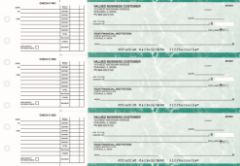
AP computer checks from Checkomatic in voucher format , print directly from QuickBooks or other accounting software with full remittance detail on the stub.
You may also find this useful: integrating QuickBooks with your business checks.
| Business Type | Best Check Format | Why |
|---|---|---|
| Small business using QuickBooks | Computer check (check-on-top) | Prints directly from QB, auto-fills all fields |
| High-volume AP (50+ checks/month) | Computer check (3-on-a-page) | Three checks per sheet, lower paper cost per check |
| Sole proprietor, minimal software | Manual check (wallet or deskbook) | No printer needed, write checks anywhere |
| Contractor writing checks at job sites | Manual check (binder format) | Portable, write checks at closings or meetings |
| Business with payroll (mixed workforce) | Payroll check (voucher format) | Pay stub fields for gross, deductions, net pay |
| Real estate, legal, or professional services | Either , depends on volume | Computer for recurring, manual for closings |
For the complete guide to voucher checks vs wallet checks and which format suits different business needs, see voucher checks vs wallet checks: which is right for your business.
Software Compatibility for Computer Checks
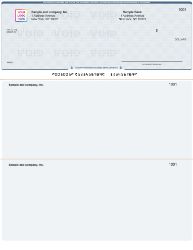
QuickBooks-compatible computer checks from Checkomatic , pre-formatted so your software fills in payee, amount, date, and memo automatically at print time.
As the original content correctly identifies, computer checks are compatible with most software. Here is what that means in practice for business owners using common accounting platforms.
- QuickBooks Desktop and Online: Checkomatic's computer checks are pre-formatted to match QuickBooks' standard check-on-top and 3-on-a-page print layouts. No alignment adjustment needed for most printers. For the complete QuickBooks check guide, see QuickBooks checks.
- Quicken: Standard check format aligned to Quicken's check print dimensions.
- MYOB: Pre-formatted to MYOB's standard check layout.
- Peachtree / Sage 50: Compatible with Peachtree and Sage 50's check printing module.
- Microsoft Dynamics: Computer check formats aligned to Microsoft Dynamics GP and Business Central check print settings.
- Other software: If your software is not listed, Checkomatic custom-formats your checks at no extra charge.
Security Features on Checkomatic Business Checks
Every Checkomatic business check , both computer and manual formats , includes security features that protect your business payments. These are not optional upgrades. They are standard on every order.
- Chemical-reactive paper: The check paper stains visibly when exposed to check-washing solvents (acetone, bleach, brake fluid). An altered check shows the tampering before the bank processes it.
- Void pantograph: A background pattern that is nearly invisible on the original check but causes VOID to appear when the check is photocopied or scanned. This deters counterfeiting.
- Microprint signature line: What appears to be a thin line is actually tiny repeating text. Photocopies and standard scans render it as a dotted line, which bank fraud systems flag.
- Heat-sensitive ink: A thermal element that disappears when pressed with a thumb. Bank tellers use this as a quick authenticity check for suspicious checks.
- ANSI E13-B certified MICR encoding: The bank routing and account numbers at the bottom of every check are encoded in MICR ink certified to the ANSI E13-B standard. This ensures every check is read correctly by bank automated sorting systems without requiring manual processing.
For the complete guide to which security features actually stop fraud, see are business checks safe: security features that actually matter.
How to Order Business Checks From Checkomatic
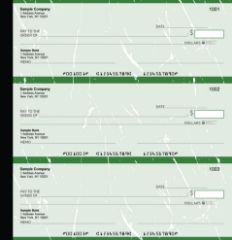
Manual executive deskbook checks from Checkomatic , the portable check option for business owners who write checks at closings, meetings, or job sites.
As the original content correctly identifies, Checkomatic has the right business check for your business type and the customer service team to assist you in purchasing the best product. Here is how the ordering process works.
What You Need to Order
- Your business name and address (as registered with your bank)
- Your bank name and address
- Your ABA routing number (from an existing check or your bank)
- Your checking account number
- Your starting check number (the first check number in your new order)
- Your business logo file (optional , for custom logo printing)
Choosing Your Format
As the original content correctly identifies, the key choice is computer checks or manual checks. If you use accounting software, order computer checks in the format that matches your software's print layout (check-on-top for most QuickBooks users, 3-on-a-page for high-volume AP). If you write checks manually or away from the office, order manual checks in wallet or binder format.
Bulk Discounts
Checkomatic offers significant discounts at higher quantities. Ordering in bulk reduces the per-check cost substantially. Most businesses order 1 to 3 months of check supply at a time. For the complete guide to choosing the right quantity and finding the best price, see what is the best place to order checks online.
What Customers Say About Checkomatic
All reviews below are published on checkomatic.com and reproduced verbatim. Source: checkomatic.com/quickbooks-starter-pack-product, 4.5 stars from 166 verified reviews.
"Been with them for 15 years. Always reliable, always good quality, good service. What more can you ask for?"
ATV Inc. | ★★★★★ 5/5 | April 5, 2024 | Source: checkomatic.com/quickbooks-starter-pack-product
"First time ordering and I am super impressed with the quality of the checks. No issues with delivery. I will be ordering again!"
TClinton | ★★★★★ 5/5 | April 9, 2025 | Source: checkomatic.com/quickbooks-starter-pack-product
"We use CheckoMatic for all of our check needs! They have great prices and we receive our products in a timely manner!"
CG's Tax Service | ★★★★★ 5/5 | September 18, 2024 | Source: checkomatic.com/quickbooks-starter-pack-product
"I got 500 checks for less than half of what the bank wanted for 200!"
VVA Voucher Checks (Vietnam Veterans of America) | ★★★★★ 5/5 | July 6, 2024 | Source: checkomatic.com/quickbooks-starter-pack-product
"ASJ Wilson Construction has been a client of checkomatic for some years now and they've never disappointed this company. Thank you checkomatic for all that you do."
ASJ Wilson Construction | ★★★★★ 5/5 | June 6, 2024 | Source: checkomatic.com/quickbooks-starter-pack-product
"Affordable and efficient. My go-to business check printer."
Doe | ★★★★★ 5/5 | January 24, 2025 | Source: checkomatic.com/quickbooks-starter-pack-product
Why Choose Checkomatic for Business Checks
Every Business Type, Every Check Format
As the original content correctly identifies, Checkomatic has the right business check for your business type. Computer checks for businesses using QuickBooks, Quicken, MYOB, Peachtree, Sage, and most other accounting platforms. Manual checks in wallet and binder format for businesses writing checks away from the office. Payroll checks in voucher format with pre-printed pay stub fields. All formats at competitive pricing with bulk order discounts. Browse all formats at business checks.
Security Features Standard , No Upgrade Needed
Chemical-reactive paper, microprinting, void pantograph, heat-sensitive ink, and ANSI-certified MICR encoding are standard on every Checkomatic business check order. There is no base tier that strips out fraud protection to lower the price. Every check you order ships with the security features your bank's fraud systems look for.
Accepted by All Major US Banks
As the original content correctly states, Checkomatic's business checks are accepted by all major US banks and credit unions. Every check includes ANSI E13-B certified MICR encoding verified before shipping to confirm it meets the standard all US banks require for automated check processing.
Customer Service Team Ready to Help
As the original content correctly identifies, Checkomatic's customer service team is ready to assist you in purchasing the best product for your business. If you are unsure whether computer or manual checks are right for your business, or if your accounting software is not in the standard compatibility list, the team will help you identify the correct format and ordering details before you place your first order.