Choosing the Right Checks for Your Business
If you operate a business, then you know a little about business checks. Regardless of if you have employees or not, you need checks to run a normal day-to-day operation. The easiest way to obtain them is by ordering business checks online.
What Kind of Checks Should I Order for My Business?
The type of checks you will want to order will really come down to preference or if you use certain software for your payroll needs, you will want to choose one that is compatible with it.
When ordering your business checks online you will be able to select your bookkeeping software first to see what is available or you can just choose what you wish if you do not use the software.
There are many different types of business checks. Do not feel overwhelmed when ordering your business checks online. Take your time and see what fits your company's needs best. Make sure you know what payroll or accounts payable software your company uses before trying to order, as some checks do not work well with all software.
Here are some of them:
Check On Top
These checks on top are the most commonly ordered by businesses. They are compatible with many of the payroll software available. This is the most common and popular choice due to the fact they do provide multipurpose voucher checks including two stubs. This way you can keep a copy for your records and give one to the employee, vendor, etc. Businesses have the capability of tracking payroll and accounts payable with this choice of a check. The name comes into play because the actual check portion is printed on the top of the document. This type of check is well suited for companies that have one main, general bank account.
Check In Middle
As you probably have guessed, these business checks print the check portion in the middle of the document. Peachtree is the main software that uses this check style. The top portion of the printout is for bookkeeping and the bottom printout portion is for the payee.
Check 3 On A Page
This style is laser printed and used predominately by QuickBooks software. It is exceptional in the fact that it saves on extra vouchers by printing 3 checks on one page, hence the name.
You may also find this useful: QuickBooks checks printing in reverse order.
Check On Bottom
The actual check portion is printed on the bottom of the document with this style. It is used by multiple types of software for payroll and accounts payable needs. All of these business checks can be ordered online and have different styles, colors, and backgrounds to choose from. It is not hard at all to order checks. In fact, the main thing you need to know is what software you use. With this knowledge, buying checks for your company can be a breeze. As you can see, it is quite simple to order your business checks online.
For the full range of business check options, browse business checks at Checkomatic.
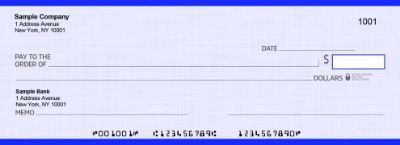
Check on Top: The Most Popular Business Check Format
As the original content correctly identifies, check on top is the most commonly ordered business check format. Here is what makes it the default choice for most businesses.
What Check on Top Looks Like
One 8.5 by 11 inch page. The check occupies the top third. Two perforated stubs fill the bottom two-thirds. The stubs display the same payment information QuickBooks or your accounting software prints: payee name, payment date, invoice number, amount, and memo. One stub goes to the payee. The second stays with the payer as a physical record.
Why Check on Top Is the Most Popular
Two stubs per check transaction is a significant practical advantage. The payee stub tells the vendor exactly which invoice is being paid without a separate remittance document. The payer stub creates a physical paper trail that matches the check register entry. Many US states require employers to provide employees with itemized wage information at each pay period , a voucher stub satisfies this requirement at the point of payment without a separate document.
Which Software Uses Check on Top
QuickBooks Desktop and QuickBooks Online default to this format for payroll. Most major payroll and accounts payable platforms support it. If you are starting a new business and have not yet chosen accounting software, order check on top , it is compatible with the widest range of platforms. For check on top formats compatible with QuickBooks and over 500 other platforms, see QuickBooks checks and computer checks for business.
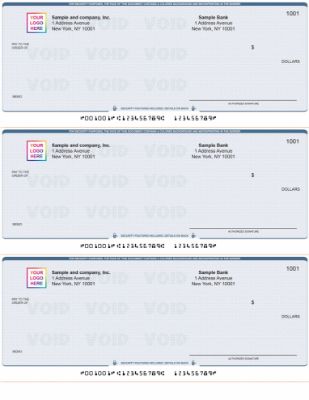
Check in Middle: The Peachtree and Sage Format
Check in middle places the check portion in the center of the page. The top section contains bookkeeping information. The bottom section is the payee stub. This layout was designed specifically for Peachtree accounting software, which Sage 50 later replaced.
Who Should Order Check in Middle
Order check in middle if your business runs Peachtree, Sage 50, or another accounting platform that specifically requires this layout in its check printing settings. Do not order this format based on preference alone , check your software print settings first to confirm it is the required layout. Using check on top stock with a check in middle software setting prints all fields in the wrong positions.
3-on-a-Page: Fast Printing for High-Volume Payments
Three checks per 8.5 by 11 inch page. No stubs. Payment records are stored electronically in your accounting software rather than on paper. Each check occupies approximately 3.5 inches of the page height.
When 3-on-a-Page Makes Sense
This format prints three times faster than check on top for the same number of payments and uses one-third of the paper. It is the right choice for high-volume accounts payable operations where digital records in QuickBooks or another platform replace physical stubs. Vendor payments, utility bills, and recurring expenses that do not require a paper remittance stub at delivery are ideal for this format.
When 3-on-a-Page Does Not Make Sense
Do not use 3-on-a-page for payroll checks where employees need a physical stub showing pay detail. The lack of stubs is a limitation for payroll in states that require itemized wage information at each pay period.
For a detailed comparison of when to use voucher vs 3-on-a-page vs wallet format, see voucher checks vs wallet checks.
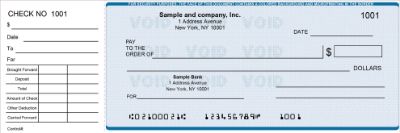
Check on Bottom: Multiple Software Compatibility
Check on bottom places the actual check in the lower portion of the page with stubs above. Multiple types of payroll and accounts payable software use this layout. The stub-above arrangement places the bookkeeping information at the top where it is easy to read before tearing off the check at the bottom.
How to Know If You Need Check on Bottom
Open your accounting software's check printing settings and look at the print preview or layout template. If the check portion appears at the bottom of the preview, order check on bottom stock. If it appears at the top, order check on top. Never guess , always confirm in your software before ordering.
Manual Checks: When to Choose Handwritten Over Printed
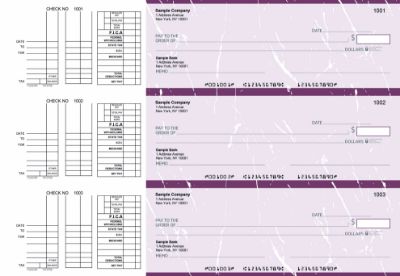
The four formats above are all computer checks printed through accounting software. Manual checks are a completely different category , handwritten in a bound binder with carbonless copy paper that creates a duplicate record as you write.
Order Manual Checks If Your Business
- Does not use accounting software for check printing
- Writes fewer than five checks per month
- Needs checks for field use where a printer is not available
- Wants an emergency backup supply when the printer or software fails
- Operates in an industry where on-site contractor payments are common
Most Businesses Keep Both
Computer checks for the regular payroll and vendor payment cycle. A book of manual checks for emergencies, field payments, and situations where the regular system is unavailable. Both types use the same account information and share the same sequential check number series. Browse manual check formats at manual checks at Checkomatic.
For a complete comparison of when computer checks are better than manual checks and vice versa, see different types of business checks: what is best for your business.
How to Confirm Which Business Check Format to Order
The original content gives the right advice: know what software you use before ordering. Here is the fastest way to confirm the exact format you need.
- Open your accounting software. QuickBooks, Peachtree, Sage, MYOB, or any platform you use for check printing.
- Go to the check printing settings. In QuickBooks: File, Print Forms, Checks. Look at the Check Style selector.
- Note the format shown. Voucher = check on top. Standard = 3-on-a-page. Check in middle or check on bottom will show in other software layouts.
- Order the matching stock. The format on the check stock must exactly match what your software is set to print.
For payroll-specific guidance on which check format works best for employee paychecks, see business checks for payroll: the complete employer guide. For guidance on finding the best source for your check order, see what is the best place to order checks online.
What Information Is on Every Business Check
Regardless of which format you order, every business check from Checkomatic arrives with the same standard information pre-printed:
- Your business name: The legal name of your company as registered with your bank.
- Your mailing address: Your business address printed in the upper left corner.
- Your bank name: The name of the financial institution where your account is held.
- Your ABA routing number: Pre-printed in certified MICR toner in the MICR line at the bottom of the check.
- Your account number: Pre-printed in certified MICR toner in the MICR line.
- Sequential check numbers: Pre-printed and continuing from the number you specify at order.
- Your company logo (optional): Free black-and-white logo printing on every Checkomatic order.
- Background design and color: Your choice from multiple design options.
Your accounting software fills in all variable fields at print time: payee name, dollar amount, date, and memo. You sign and send.
Security Features Every Business Check Should Include
As the original content notes, all of these business check formats can be ordered with different styles and backgrounds. Beyond appearance, security features are an equally important factor in which checks to order for your business.
Checkomatic includes six security features at the base price on every business check order regardless of format:
- Chemically sensitive paper: Reacts visibly when check washing solvents contact the paper, permanently staining the sheet.
- Microprinting: Text under one point size along the signature line that appears solid to the naked eye but degrades to blur on any photocopy.
- Void pantograph: A hidden pattern in the check background that displays VOID when the check is photocopied or scanned.
- UV fluorescent fibers: Embedded in the paper during manufacturing. Glow under ultraviolet light used by bank authentication equipment.
- Heat-sensitive ink: Disappears when rubbed with a finger and reappears when released.
- Genuine watermark: Embedded during paper manufacturing. Visible when the check is held to light.
No security upgrade fee. All six features are standard on every format , check on top, check in middle, 3-on-a-page, check on bottom, and manual checks.
Accepted by the World's Leading Banks
Every business check from Checkomatic , in all four computer formats and all manual formats , meets and exceeds ABA (American Bankers Association) specifications. The MICR line is pre-printed in certified magnetic toner and verified against the Federal Reserve E-Payments Routing Directory before production. All formats clear at any US bank without rejection. ABA compliance is standard on every order regardless of format, quantity, or design. Browse all business check formats at business checks and computer checks for business.
What Customers Say About Checkomatic Business Checks
All reviews below are published on checkomatic.com and reproduced verbatim. Source: checkomatic.com/quickbooks-starter-pack-product, 4.5 stars from 166 verified reviews.
"First time ordering and I am super impressed with the quality of the checks. No issues with delivery. I will be ordering again!"
TClinton | ★★★★★ 5/5 | April 9, 2025 | Source: checkomatic.com/quickbooks-starter-pack-product
"Been with them for 15 years. Always reliable, always good quality, good service. What more can you ask for?"
ATV Inc. | ★★★★★ 5/5 | April 5, 2024 | Source: checkomatic.com/quickbooks-starter-pack-product
"We use CheckoMatic for all of our check needs! They have great prices and we receive our products in a timely manner!"
CG's Tax Service | ★★★★★ 5/5 | September 18, 2024 | Source: checkomatic.com/quickbooks-starter-pack-product
"I got 500 checks for less than half of what the bank wanted for 200!"
VVA Voucher Checks (Vietnam Veterans of America) | ★★★★★ 5/5 | July 6, 2024 | Source: checkomatic.com/quickbooks-starter-pack-product
"ASJ Wilson Construction has been a client of checkomatic for some years now and they've never disappointed this company. Thank you checkomatic for all that you do."
ASJ Wilson Construction | ★★★★★ 5/5 | June 6, 2024 | Source: checkomatic.com/quickbooks-starter-pack-product
"Affordable and efficient. My go-to business check printer."
Doe | ★★★★★ 5/5 | January 24, 2025 | Source: checkomatic.com/quickbooks-starter-pack-product
Why Choose Checkomatic for All Types of Business Checks
All Four Computer Formats Plus Manual Checks
Check on top, check in middle, 3-on-a-page, check on bottom, and manual checks , all manufactured at Checkomatic's own facility in Monroe, NY since 1997. Every format available in multiple background colors and designs with free logo printing on every order.
Compatible With Over 500 Accounting Platforms
QuickBooks Desktop, QuickBooks Online, Peachtree, Sage 50, MYOB, Xero, Quicken, Microsoft Dynamics, and over 500 other platforms. Check stock is pre-calibrated to match your software's print template. Alignment is correct on the first print without test runs or adjustments.
Six Security Features at the Base Price
No security tier upgrade needed. All six fraud prevention features are standard on every format at no extra charge: chemically sensitive paper, microprinting, void pantograph, UV fluorescent fibers, heat-sensitive ink, and genuine watermark.
Free Logo Printing on Every Order
As the original content notes, every format comes with different styles, colors, and backgrounds to choose from. Black-and-white logo printing is included free on every business check order regardless of quantity or format.
ABA-Verified MICR and Fast Turnaround
Every routing number verified against the Federal Reserve E-Payments Routing Directory before production. Standard shipping in 3 to 5 business days. Rush production available in 1 to 2 business days. Browse all formats at business checks and computer checks for business.